

Build No-Code WhatsApp Chatbot Flows in Minutes
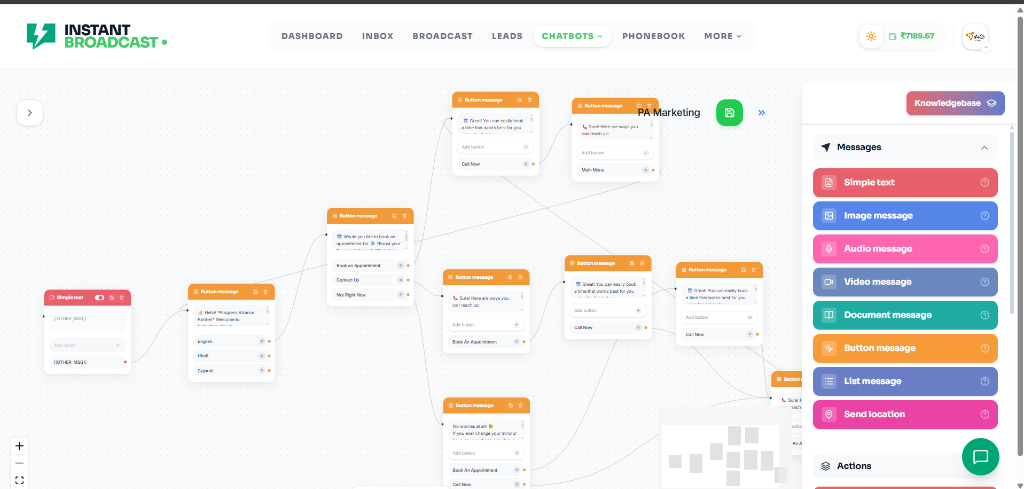
Design interactive conversation paths, automated keyword responses, and rich button menus with an intuitive visual drag-and-drop canvas.
Why Use Visual Chatbot Flows?
Replace complex manual replies with an automated visual canvas that engages and converts visitors automatically.
Without Chatbot Flows
- Manual typing to answer routine and repetitive customer questions
- Slow lead qualification leading to lost sales opportunities
- Rigid text-only menus with high user drop-off rates
- No structured branching or conditional logic for varied user intents
- Clunky, disjointed handoff between automation and live team members
With Instant Broadcast Flows
- Interactive quick-reply buttons and scrollable list menus for 1-tap responses
- Visual branching logic tailored dynamically to customer choices
- Automated phonebook variable capture and CRM contact tagging
- Multi-keyword and exact-match trigger rules that start flows instantly
- Seamless 1-click routing to human agents in your shared inbox when requested
Everything You Need for Powerful 24/7 Flow Automation
Intuitive visual canvas and rich interactive WhatsApp components engineered to convert conversations into customers.
Visual Drag-and-Drop Canvas
Design multi-step conversation paths, button menus, and conditional branches in minutes with zero coding required.
Interactive Buttons & Lists
Send quick-reply buttons, call-now CTAs, and scrollable list menus to guide customers effortlessly through choices.
Rich Media & File Delivery
Deliver PDF brochures, product images, video walkthroughs, and location pins automatically based on user selections.
Lead Qualification & CRM Variables
Capture customer requirements, budget, email, and location and automatically save them into phonebook custom fields.
Instant Live Agent Escalation
Seamlessly route complex inquiries from the automated flow directly into your Shared Multi-Agent Team Inbox.
Keyword & Event Triggers
Trigger flows automatically on keyword match, first incoming message, QR code scan, or Meta click-to-WhatsApp ads.
How It Works
Deploy your automated WhatsApp chatbot flow in 4 easy steps.
1. Define Trigger
Choose keyword triggers, greeting messages, or button clicks to start the flow.
2. Build Visual Steps
Drag and drop message nodes, interactive buttons, media files, and branching paths.
3. Connect Variables & Tags
Attach FAQ responses, custom CRM fields, and department routing rules.
4. Launch 24/7 Automation
Activate your flow to engage, qualify, and convert customers around the clock.
Manage & Scale Multi-Branch Chatbot Workflows
Automate your business processes with high-performance chat flows that engage, qualify, and convert 24/7.
- Visual drag-and-drop node graph with unlimited branching depth
- Auto-start triggers for incoming messages and marketing ads
- Full conversation history synced with customer phonebooks
- Role-based agent routing for escalations and high-ticket sales
- Continuous performance monitoring with real-time execution analytics
Ready to Build Your Automated WhatsApp Flows?
Design interactive chatbot flows, qualify leads, and delight customers with Instant Broadcast.